
SolveigMM Video Splitter3.2.1206.9 - Download
You'll be able to download in few seconds.
Publisher Description
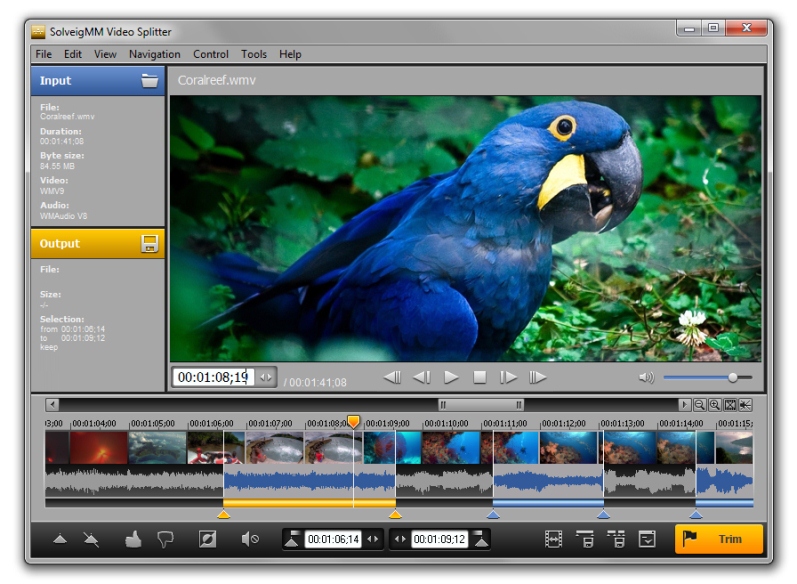
SolveigMM Video Splitter is a fast tool to losslessly split, cut or trim MPEG-1, MPEG-2, AVI, WMV, WAV, MP4, MOV, MKV, AVCHD, ASF, MP3, WMA files. Batch file support is included. Files joining supported.
The attractive and intuitive user-friendly interface allows a user to split, cut or trim a movie in just a few mouse clicks.
Based on SolveigMM Video Editing SDK, the Video Splitter offers incredible quality and speed involving no encoding/decoding operations.
Solveig Multimedia is proud to introduce a new feature to make movie cuts quick and easy. Now if you need to cut commercials from your movie, just set the fragments to be cut off and our video editor executes the task in one pass.
* Based on SolveigMM Video Editing Engine
* Supports any MPEG-2 PS/TS Format files - (*.mpg,*.ts,*.vob )
* Supports MPEG-1 files
* Supports any AVI Format files - (*.avi )
* Supports Windows Media Format files - (*.asf, *.wma, *.wmv, *.wm)
* Supports MPEG Audio Format files ( *.mp1, *.mp2, *.mp3, *.mpa )
* Supports WAV files
* Supports MP4, MOV, MKV, AVCHD files frame accurate editing
* K frame/GOP accuracy trimming for MPEG-2, MPEG-1 files
* What You See Is What You Get (WYSIWYG) preview. Advanced K frame navigation
* Cut commercials - video cutting of several movie portions at one time is allowed. You can get rid of all ads in your movie in a couple of simple steps
* Supports bath files (*.xtl). You can process the trimming of all media files in one pass.
* Supports file by file joining (AVI, WMA/WMV/ASF, MP3 and MPEG-1, MPEG-2 video)
* Sound control option
* Version Info Check option
* Recent files view option
* Logging feature
* One click registration
* Save audio only from AVI, ASF, MPEG-2 PS/TS, MPEG-1 SYS files
* Ability to mute selected audio fragment without re-encoding for audio types
* Turn off audio/video track for selected files in Batch Manager
* Has official mark "Compatible with Windows 7" from Microsoft corporation
About SolveigMM Video Splitter
This Video Tools program is available in English, Chinese, French, German, Italian, Japanese, Russian. It was last updated on 29 September, 2026. SolveigMM Video Splitter is compatible with the following operating systems: Windows, Windows-mobile.
The company that develops SolveigMM Video Splitter is Solveig Multimedia. The latest version released by its developer is 3.2.1206.9.
The download we have available for SolveigMM Video Splitter has a file size of 21.0 MB. Just click the green Download button above to start the downloading process. The program is listed on our website since 2012-06-09 and was downloaded 0 times. We have already checked if the download link is safe, however for your own protection we recommend that you scan the downloaded software with your antivirus. Your antivirus may detect the SolveigMM Video Splitter as malware if the download link is broken.
How to install SolveigMM Video Splitter on your Windows device:
- Click on the Download button on our website. This will start the download from the website of the developer.
- Once the SolveigMM Video Splitter is downloaded click on it to start the setup process (assuming you are on a desktop computer).
- When the installation is finished you should be able to see and run the program.
Program Details
General
System requirements
Download information
Pricing
Version History
version 3.2.1206.9
posted on 2012-06-09
Features:
- Audio Waveform
- Ability to mute selected audio fragments without re-encoding for audio types: mpeg audio (v1, v2, l1, l2, l3), aac, ac3, wma (v2, v3, voice), pcm, ms adpcm, intel adpcm
- Saving elementary video stream for AVI files with AVC1
version 2.1
posted on
- Added MPEG-2 High Defenition files. Fast frame accurate editing mode.
Disclaimer
External Download
We do not host SolveigMM Video Splitter on our servers. We did not scan it for viruses, adware, spyware or other type of malware. This app is hosted by the software publisher and passed their terms and conditions to be listed there. We recommend caution when installing it.
The external download link for SolveigMM Video Splitter is provided to you by apps112.com without any warranties, representations or guarantees of any kind, so access it at your own risk.
If you have questions regarding this particular app contact the publisher directly. For questions about the functionalities of apps112.com contact us.
